I’m starting to clear out things I had since 2004/5 and this happens to be one of them. (Funny how I had this book for 20 years before ‘getting it done’.
The table of contents are pretty in depth so I’m going to try just including big thoughts and actionable items without the fluff.
Very well explained video on the GTD Method
The aim is to get to mind like water where you can be calm, responsive and resilient or have the least friction on your ‘swing’. Things like thinking about helping end world hunger can be a point of friction.
Basic Requirements for Managing Commitments
- Put it in buckets and have a system to go through them to either action them, discard them or put them on the calendar to do.
- Ask yourself what is bothering you right now, what interests you or distracts you. You need to deal with sooner rather than later.
- In a single sentence, write down the outcome you want. What would need to happen for you to check this project off as DONE?
- Now write down the very next step/physical action to move this forward. What visible action would you take?
Knowledge Work: Outcome thinking make wishes come to reality.
Take it off your mind until you put it on a reminder to take the next step. If it’s on your mind you will only think about changing batteries when you get to the dead torch.
You want to get to the point of keeping nothing on your mind by managing your actions.
Horizontal control manages all your tasks and is broad while vertical control manages the whole individual track of a specific task and is focused. To get to this you need to get this all out of your head, start making lists!
5 Stages of Mastering Workflow
1 – Collect
- Gather 100% of all the things you think are incomplete. Email, messages, tasks, loops to be closed. Anything with should, need to or aught to. Capture into the right containers and develop the right systems so the containers are effective.
- Collection tools can be in baskets. Notepads could be used for random thoughts. You can use audio, email, etc.
- Success factors: Every open loop must be in your collection system and out of your head, you must have as few collection systems as you can get by with and you must empty them regularly. Make this part of your lifestyle.
2 – Process
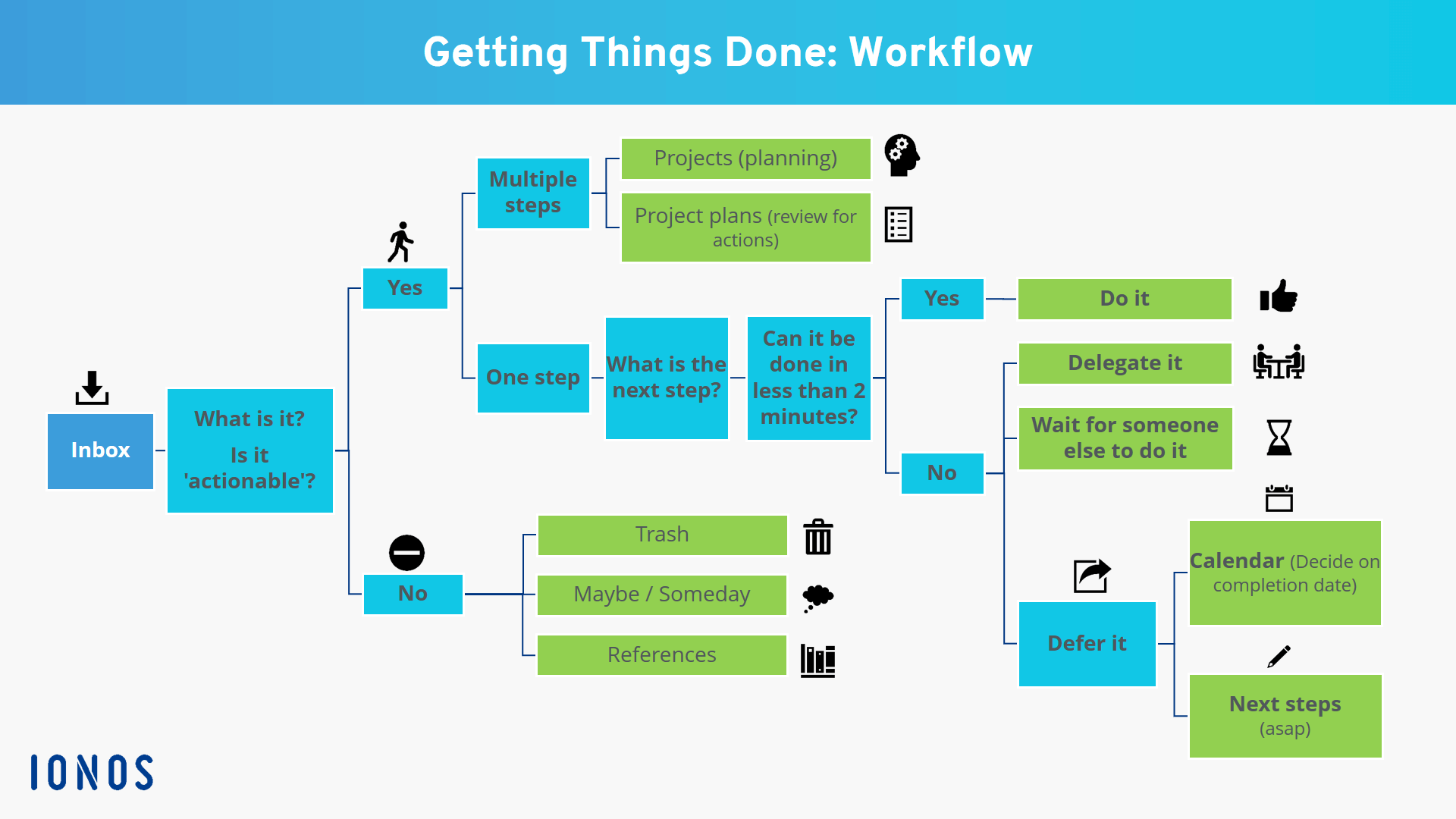
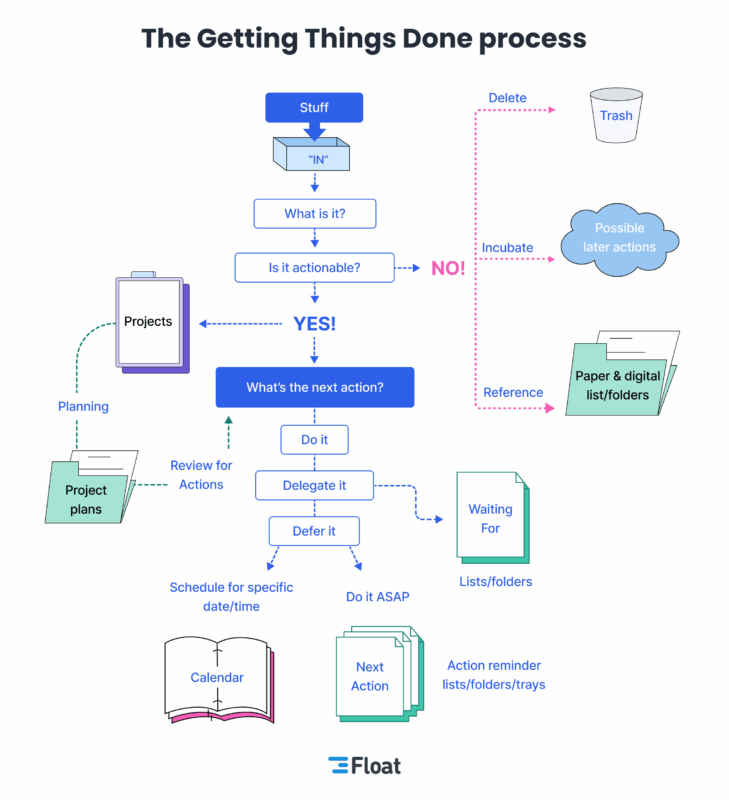
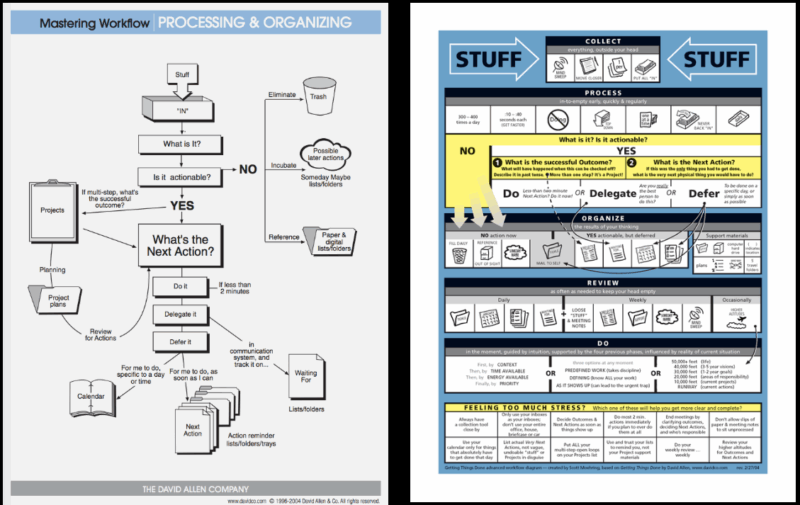
- Ask what it is? Is it actionable, etc. See below flowchart below.
- What is the next action required? Deleted (bin), incubate (tickler system), reference (filing system), do/delegate/defer.
- Always have a next action for open loops.
- If it takes less then 2 minutes to do it… then DO IT! If more than 2 minutes then ask if you’re the right person to do it or Delegate it. If it’s more than 2 minutes and you are the one that needs to do it then you defer it by putting it on a next action list.
3 – Organise
- You’ll need to use a calendar, a next action list, incubating reminders and other systems.
- A project is any task that needs more than one action step. They don’t need to be organised, but they need next actions and somewhere where you won’t forget it.
- Projects can be named in different ways as themes, topics, times, etc. e.g. Wedding file. Store support materials out of sight while others you’ll need are easily accessible.
- Next actions are physical and visible. Anything that need to be done on a specific time or place put in the calendar.
- 3 things that go on your calendar are time specific actions, day specific actions and day specific information. Author recommends no more daily todo lists! (Paras note: BLASPHEMY) If you write something on a calendar it must get done then!
- If you only have 20 or 30 next actions list you can just use one list.
- Some day maybe list: You can collect wishlist and similar items here and review them weekly.
- Tickler file or Suspended/Follow on file: Just somewhere you have things to reference and don’t have somewhere to put it. (More info below)
- Reference should be something you can easily get to if needed and take 2 forms. Topic/interest (closed cases) and general (instruction manuals).
4 – Review
- The weekly review is a critical success factor. This helps gather, process and clean up your actions and your head.
5 – Do (3 Models) will help
- The 4 Criteria: 1 – Context, 2 – Time available, 3 – Energy available, 4 – Priority.
- The 3-Fold Model for Evaluating Daily Work: 1 – Doing predefined work, 2 – Doing work as it shows up, 3 – Defining your work.
- The 6-Level Model for Reviewing your work: 1 – Runway/Current actions, 2 – Current projects, Areas of responsibility, 3 – 1-2 Year goals, 4 – 3-5 Year vision, 5 – Life/The bigger picture.
- Unnatural Planning: Trying this will be difficult with no clarity and persons responsible.
- Reactive Planning: Oh I thought you were going to do that until someone say ‘we need to get organised’.
- Natural Planning:
– 1 Purpose: It’s important to ask why. What is the purpose? It defines success. Complete sentence ‘I will give anyone free reign to do as they want as long as they…..’ (Include your policies, rules, budget, timeline, etc.)
– 2 Vision/Outcome: Your focus is very important. Being able to clarify outcomes will be a handy lifetime skill. First view the outcome from beyond the completion date. Second, envision while SUCCESS! Third, capture in detail what the outcome looks like.
– 3 Brainstorming: You can use graphic ideas like mind mapping. Talks about distributed cognition, you can separate them into cards and reorganise as needed. In brainstorming don’t judge, challenge, evaluate or criticise as you want to get as much quantity instead of quality. You’re going for expansion. Analysis and evaluation can come next.
– 4 Organising: When you follow the steps, a natural organising starts happening. You can use tools to plan the project, gantt charts and prioritising projects.
Basics of Organising: 1st identify significant pieces, 2nd Sort by components, sequences and/or priorities, 3rd Detail to the required degree.
– 5 Next Actions: The final step is to ask what the next action is. Find every next action, allocate and if anyone can do it now. - Remember to only plan as much as you need to. Some just need a listing, others may need brainstorming, meetings, etc.
Implementation Tricks
- Example: Putting your work on your keys so you don’t forget to take things in front of you.
- Capture a list of things in your head that you need to do and you’d find at least one that you go ‘oh yeah, I need to do that one’.
- Set up a specific space and time to do these activities (author recommends 2 days, or minimum 6-8 hours). For space you just need a place for writing and in basket as a minimum but you can add more from screens to diaries, etc. You still need a space at home. You may need an office space while moving around (briefcase with things). Do not share this space! Author doesn’t recommend hotelling, so I’ve not added details on it.
- Tools: Paper, pen, 3 trays, labeler, (with A/C adapter), file/folders, calendar, bins, etc. There is a pdf somewhere for the full list. You may need an organiser.
Filing/Folders
- You need a good reference system.
- Maintain your own personal filing system. It has to be fun, fast, easy. Any new items should be easy to file, even menu’s should have a special place. If you have to get up to file it, it’s a friction point.
- One A-Z system should do the trick. Can be by topic, person, business, etc.
- Have lots of fresh folders, at least half of your folders should be brand new ones.
- Label them so that they’re easy to read and spot.
- Get high quality drawers and cabinets.
- Author doesn’t recommend hanging folders. They get uneven and not easy to carry with you with the hooks.
- Clean files at least once a year.
- Make sure you block out time that is uninterrupted, block phones, let people know, close unneeded windows.
Collecting
- Collection means going through everything, every nook and cranny. Author suggests 3 hours.
- Put everything that needs processing in your In basket. Even unorganised items, supplies that need attention, plants that need watering. So if you can fit it in the in basket, make a note and put that in the in basket and create stacks around the basket so it’s visual that it’s part of the IN part and not near the bin.
- Don’t worry about your existing lists and processes. They will belong to the IN basket too as you get used to this new way.
- Start with your desktop from one end to another. While doing this make a note of what your desk needs like new equipment and make a note for the IN basket.
- Next go inside the cabinets, then floors, walls and shelves. Then equipment, furniture and fixtures. Then other locations.
- What else is gathering in your mind? Write each and every piece into separate sheets for the In basket. Author recommends 1 hour and it’s better if you over do it. When something occurs to you, write it down and In basket it.
Processing – In to Empty
- Basic rules: Process top item first, do it one at a time.
- Ideally you should do FIFO so you take your pile and flip it upside down before starting.
- Some people need to multitask so 3 or so items can be ok to work with.
- You’ll find a lot of stuff goes to trash, the rest will go to incubate or reference.
- Incubate things that you need some time later and you can put them in a Sunday list or put in a ‘maybe file’.
- If there is an action on the item, what is the next action? What’s the next action for clean the garage? Do you need to get the refrigerator out? IT HAS TO BE THE ABSOLUTE NEXT PHYSICAL THING TO DO. Then do, delegate or defer it accordingly. Try time yourself, author recommends using the 2 minute rule. If it takes less than 2 minutes, DO IT!
- Order of actions: Email, written notes, voicemail but tracking is an issue, agenda list.
- Finally identify the projects even if it just has one step.
Organising
- You need separate piles from next actions to the calendar. Make sure they go in the right list so it moves on. You just need lists and folders and ways to manage them.
- A good idea is leveraging your energy in different modes. Make all your calls when you’re in phone mode.
- Modes:
– Calls: keep the phone number ready at the list.
– At computer: is your desk set up with everything you need.
– Errands: could be a post it or to do list with sub lists.
– Office: Obvious one.
– Agendas: Make announcements and prepare notes as needed, separate files may be needed for different stakeholders.
– Running list: For things like plumbing visiting.
– Read/Review: If it needs more than 2 minutes, stack them.
– Waiting for: Most probably just a trigger to keep close at hand. - You can sort projects by personal and professional.
- (Paras note: Things are starting to sound very micro-managy so I’ve skipped obvious organisation things. Or it’s a lot of repeating and not that important).
- The tickler file is just a way you store things that come up on a date that you want it to come up on. It needs to be updated everyday. If using paper just have separate folders for months and files for days in the month folder and circulate as needed.
Tickler file video explanation
Reviewing
- As long as you have your systems in order you will follow it, if it’s not ready or reliable then you are more likely not to refer to it.
- Look at your calendar first, then your action list, have a weekly review, have the right time and place so everything is ready and has minimal friction points.
- The weekly review is everything you need to do to get your head empty again. Put it all in the in basket or somewhere you know you will process it. Make sure you block out a couple of hours every week to do this and have a special place for this until you make it a habit.
4 Criteria for choosing actions in the moment
- Context: what can you do where you are with what you have.
- Time available: how much time do you have until the next thing. Do the 10 minute thing in your list if you have 10 mins.
- Energy available: Keep a list of things to do when you have low energy like refilling stuff, reading, etc.
- Priority: What is the next most important thing for me to do?
6-Level Model for Reviewing Your Own Work
(They are all the same at different levels e.g. the big picture you want to be will mean the current small actions you need to take now)
- 50,000+ feet: Life: The “big picture” view. Everything else goals, responsibilities, projects, and tasks as below.
- 40,000 feet: Three- to five-year vision. Decisions here shape your shorter-term goals and influence the responsibilities and projects you take on.
- 30,000 feet: One- to two-year goals. Having clarity here helps you decide which areas of responsibility to prioritize and which projects to pursue.
- 20,000 feet: Areas of responsibility. These might include roles at work, health, family, finances, and more. It provides a framework for evaluating your current projects.
- 10,000 feet: Current projects. Projects are collections of related tasks that work toward a specific goal.
- Runway: Current actions. This is the ground level – the list of tasks you’re actively managing. Emails, errands, proposal drafts, calls to make, things to fix at home.
(Implementing all the levels is recommended to have a balanced life and you can work up to down or in reverse but go through all.)
So far we’ve looked at the horizontal level of projects and tasks. Now we’ll go through the vertical steps for each horizontal unit.
- Author prefers working from the bottom up.
- Obvious stuff like having the right tools in the right place.
- Goes a long round about way of using the ‘POWER OF SAYING NO’ (Insert link)
- Start taking steps to make sure you get things done especially if they keep nagging in your mind.
- Remember the more you collect or write things down you’ll feel better as you know it’s somewhere you know you will or have to action.
- Make sure your next action is set so you’re not guessing and putting friction on your movement. Family meetings – So what’s the next action? Someone complaining – So what’s the next action?
- Remember the power of outcome focusing.
Ends with offering help with some contact details.
Hey folks, it’s Paras!
If you have a request to see a tech product, summary on personal development or want a custom design for clothing and merch … Please do let me know through the links below.

Join me or support my work
🎤 Podcasts: My Stories | Self Growth
💌 Monthly email summary
▶️ YouTube | TikTok | Instagram
👍 Facebook | X | Blog
Other links:
💰Get $25 of FREE Bitcoin
☕ Buy me a Coffee
🛒 My Amazon |👕 My Merch
🏫 Join Skool
Contents
- Welcome to Getting Things Done
- The Power, Simplicity, and Effectiveness of What I’m Talking About …
- Part One: The Art of Getting Things Done. Chapter 1: A New Practice for a New Reality
- The Problem – New Demands, Insufficient Resources
- Work No Longer Has Clear Boundaries
- Our jobs Keep Changing
- The Old Models and Habits Are Insufficient
- The Big Picture vs. the Nitty Gritty
- The Promise – The Ready State of the Martial Artist
- The Mind-Like-Water Simile
- Can You Get Into Your Productive State When Required?
- The Principle – Dealing Effectively with Internal Commitments
- The Basic Requirements for Managing Commitments
- The Real Work of Knowledge Work
- Why Things Are on Your Mind
- Your Mind Doesn’t Have a Mind of Its Own
- The Transformation of Stuff
- The Process – Managing Action
- Managing Action Is the Prime Challenge
- The Value of a Bottom-Up Approach
- Horizontal and Vertical Action Management
- The Major Change – Getting It AlI Out of Your Head
- Chapter Two: Getting Control of Your Life
- Collect
- The Collection Tools
- The Collection Success Factors
- Get It All Out of Your Head
- Empty the Buckets Regularly
- Process
- What Is It?
- Actionable
- Organise
- Projects
- Project Support Material
- The Next Action Categories
- Calendar
- The Next Actions List
- Reference Material
- Review
- Critical Success Factor – The Weekly Review
- Do: One – The 4 Criteria for Choosing Actions in the Moment
- Two -The 3-Fold Model for Evaluating Daily Work
- Three- The 6-Level Model for Reviewing Your Own Work
- Chapter Three: Getting Projects Creatively Underway
- The Natural Planning Model
- Natural Planning Is Not Necessarily Normal
- The Unnatural Planning Model
- Let’s Blame Mrs. Williams
- The Reactive Planning Model
- Natural Planning Techniques – The Five Phases
- The Value of Thinking About Why
- Principles
- Vision Outcome
- The Power of Focus
- Clarifying Outcomes
- Brainstorming
- Capturing Your Ideas
- Disturbed Cognition
- Brainstorming Keys
- Organising
- The Basics of Organising
- How Much Planning Do You Really Need to Do?
- Need More Clarity?
- Need More to Be Happening?
- Part Two: Practising Stress-Free Productivity
- Implementation
- Setting Aside the Time
- Setting Up the Space
- If You Go to an Office, You’ll Still Need Space at Home
- An Office Space in Transit
- Don’t Share Space
- Getting the Tools You’ll Need
- File Folders
- Do You Need an Organiser?
- The Critical Factor of a Filing System
- Success Factors for Filing
- Have Lots of Fresh Folders
- Get Rid of Hanging Folders If You Can
- One Final Thing to Prepare
- Chapter Five: Collection
- Ready, Set…
- Physical Gathering
- Issues About Collecting
- Start with Your Desktop
- Mental Gathering – The Mind Sweep
- The “In” Inventory
- Chapter Six: Processing – Getting “In” to Empty
- Processing Guidelines
- The Multitasking Exception
- Incubate
- Reference
- And If There Is an Action, What Is It?
- The Action Step Needs to Be the Absolute Next Physical Thing to Do
- Do It
- Delegate It
- Defer It
- Identifying the Projects You Have
- Chapter Seven: Organising – Setting Up the White Buckets
- All You Really Need Is Lists and Folders
- Organising Action Reminders
- Organising Asap Actions by Context
- The Most Common Categories of Action Reminders
- Errands
- Agendas
- Organising “Waiting For”
- Managing Paper- Based Work Flow
- Managing Email-Based Work Flow
- Getting Email “In” to Empty
- A Caution About Dispersing Reminders of Your Actions
- One List, or Subdivided?
- What About Sub-Projects?
- Project Support Materials
- Organising Ad-Hoc Project Thinking
- Organising Non-Actionable Data
- The Variety of Reference Systems
- Libraries and Archives – Personal Levels
- Someday, Maybes
- Special Categories of Someday, Maybe
- Using the Calendar for Future Options
- The Tickler File
- Checklists – Creative Reminders
- The More Novel the Situation the More Contrails Required
- Chapter Eight: Reviewing – Keeping Your System Functional
- Looking at Your Calendar First
- The Power of the Weekly Review
- The Right Time and Place for the Review
- The Bigger Picture Reviews
- Chapter Nine: Doing – Making the Best Action Choices
- Time Available
- The 3-Fold Model for Evaluating Daily Work
- If Choosing to Do Work That Just Showed Up …
- The Moment to Moment Balancing Act
- The 6-Level Model for Reviewing Your Own Work
- Working From the Bottom Up
- While the 50,000 Foot Level Is Obviously the Most Important Context ..
- 20,000 Feet
- 30,000-50,000+ Feet
- Through a Larger Scope You Might Assess …
- Getting Priority Thinking Off Your Mind
- Chapter Ten: Getting Projects Under Control
- Which Projects Should You Be Planning?
- Random Project Thinking
- The Computer
- Brainstorming Applications
- Part Three: the Power of the Key Principles
- Don’t Make the Agreement
- Renegotiate Your Agreement
- The Radical Departure From Traditional Time Management
- When Relationships and Organisations Have the Collection Habit
- Chapter Twelve: The Power of the Next Action Decision
- Creating the Option of Doing
- Why Bright People Procrastinate the Most
- Intelligent “Dumbing Down”
- The Value of a Next Action Decision Making Standard
- Productivity
- Chapter Thirteen: The Power of Outcome Focusing
- The Significance of Applied Outcome Thinking
- The Magic of Mastering the Mundane
- The Power of Natural Planning
- Shifting to a Positive Organisational Culture
- Conclusion
Hey folks, it’s Paras!
If you have a request to see a tech product, summary on personal development or want a custom design for clothing and merch … Please do let me know through the links below.
Join me or support my work
🎤 Podcasts: My Stories | Self Growth
💌 Monthly email summary
▶️ YouTube | TikTok | Instagram
👍 Facebook | X | Blog
Other links:
💰Get $25 of FREE Bitcoin
☕ Buy me a Coffee
🛒 My Amazon |👕 My Merch
🏫 Join Skool


